Design

I’ve redesigned my website several times and have spent the past few years running Chyrp, a lightweight PHP blogging/tumblogging engine. After I learned the lead developer would no longer actively develop Chyrp1, I stopped watching the community and kind of let my site rot. I was busy doing Relatively Early work where I was exposed to Harmony and I instantly fell in love with it. Building and maintaining client sites on it is a breeze, and it’s fun to do. After learning what I could do with it I decided to port my site over, wanting to simplify things anyway.

Although I will miss being involved in the development community of an open-source blogging engine, moving to Harmony provides me with lots of data flexibility and options without the hassle of maintaining my own software installation. The guys at Ordered List keep rolling out awesome new features. No, it’s not free, but the monthly cost of hosting + a killer CMS is very fair.

As for the site structure, I wanted a simple blog where I could highlight some projects I’ve worked on without feeling like I was juggling a bunch of pages or splitting things up into categories. The home page is just a blog where you can access tags and archives at the bottom or from article headers.

To highlight projects I thought were significant I threw together the campily-named “Lifetime Achievements” section. Clicking on the tagline in the page header reveals an icon grid of blog posts about big projects. I had a little too much fun with CSS3 animations and transitions. The name/date sorting functionality is made possible with Quicksand. I think it will be a fun and fairly painless way to document things I’ve worked on.

The overall design and colors are based on my favorite shirt:

The shirt of Inspiration!

I’ve moved most of my old posts over, but this is more of a fresh start. A webby do-over!


1 Although it seems that semi-recently Chyrp was kicked into active development again and released a 2.1.

This is the last micro-site I’ll make for myself for a while… I promise. View it in Safari, Chrome, or some other WebKit-based browser. Until everyone else catches up and implements CSS animations, transforms, and gradients as well as WebKit does, I’ll be happy to serve up a degraded experience to them.

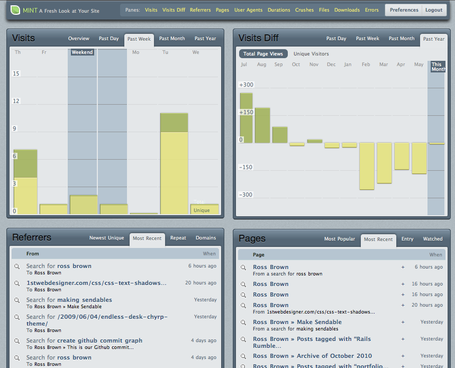
I’m a big fan of Mint and use it to monitor stats on this site. During a span of free time yesterday I decided to create a new Style for it. The current native styles use a lot of images for rounded corners and shadow effects. As much as I like the Dark Pepper Mint theme, I wanted something lighter without being blinded by white.

Winterfresh Mint Style

There is heavy use of border-radius, border-image, box-shadow, and text-shadow CSS3 properties in the style. I also threw in some webkit-transition for tab background color animation and webkit-gradient for pane header backgrounds. I’m happy with how it turned out. Plus, Matt points out that using this Style on the iPad makes him feel like he works for NASA.

Tested in Safari 4, Firefox 3.6, Chrome, iPhone Mobile Safari, and iPad Mobile Safari. Webkit is a winner here. Internet Explorer untested and unsupported.

You can download the style from the Peppermill and fork it on Github.

Matt suggested a while ago that, since I own “rossisbrown.com”, I buy the domain “whyisrossbrown.com” as well. After about three minutes of laughing, I did.

I am now using it to point to a portfolio (or what I’m calling a Portfolio Machine) of both my web and music/audio work. Looking at it makes me think of a wood and plastic iPad. I built and designed the thing, with occasional input from Matt.

The page is javascript-heavy. The portfolio items, shown as VHS tapes on a shelf, are made up of markup generated by underscore.js, meaning I only have to update a nicely formatted javascript file to add new portfolio items. It also means search engines won’t crawl it, so there’s a trade-off. It’s a work in progress, but I think it’s a lot of fun. The next version will include direct portfolio item urls and back button functionality, provided by Sammy and Matt’s brain.

It’s open sourced on Github with very little documentation, so fork it and hack away at your own.

Matt and I have been working on Signal Chains for a few months, and are finally somewhat ready for the public to see it. I’m going to create a crisis here to make what we did seem so much cooler:

The Problem: Audio gear is expensive. Few brick and mortar stores carry expensive audio gear and will let you get your grubby little hands all over it before purchasing. Conversely, when people post audio samples online, you’re not always sure what is involved. Is it really that mic that sounds that way? Or is the preamp they’re using coloring the sound?

The Solution: Signal Chains is essentially a way for audio engineers (or those who call themselves audio engineers) to share their signal flows through audio samples, documenting each piece and process involved. It does this by providing a somewhat standardized method of doing so.

The Pieces

Gear

Signal Chains gear types

The building blocks of Signal Chains. The tools that real engineers use to accomplish the sound they have in their head. Gear can be added by anyone, but and emphasis has been put on search in order to avoid duplicate entries. Gear can be added straight from the gear type page or on the fly during chain creation. When “browsing mics”:http://signalchains.com/mics, for example, I can select Condenser from “Type”. Doing this shows me only condenser mics in the database.

Signal Chains gear search

If I want to further narrow my search, I can enter AKG in “Make”. At the moment, there is only one AKG Condenser in the database (let’s change that!), so the C414 is listed. Alternatively, if I don’t find the AKG Condenser I’m looking for, I can add it by clicking the New Mic button. Doing this will over time build a large database of audio gear, with which we can take over the world.

Viewing a gear page gives you a list of chains that gear is involved in, allowing you to hear it in different scenarios.

As a side note, the whole concept for Signal Chains came from the amount of visits I get to my post about the Cascade Fat Head. I made a little song to test the mic out in different applications. Apparently lots of people want to know what this thing sounds like, so why not provide one central place for them to do so?

Chains

The heart of Signal Chains is, of course, the chain. A chain is involves the following:

  • An input source – Microphone or Line Input
  • A preamp
  • Optional extra gear – Dynamics Processors, Equalizers, Effects Processors, and Converters
  • A 30 second audio sample of the recorded audio
  • Optional (but encouraged) notes about all gear used in the process.

Signal Chains gear rack

The gear is displayed in a virtual rack where it can be reordered with drag-and-drop ease. Notes are displayed in the rack, and the individual gear’s pages can be accessed easily. Gear is added one item at a time to encourage thorough explanation of each piece. Chains can be tagged with terms for search purposes. At the moment, I’m using them to label “what instrument”:http://signalchains.com/tags/guitar is being recorded.

A Signal Chain

Users can Like and Comment on chains, hopefully fostering a community environment and further discussion about the process involved. Likes are virtual pats on the back, while Comments are a way to make it known to the public that you are far superior to the user who created the subject content. You know, just like anywhere else on the internet.

Audio

Arguably the most important piece of a chain is the audio. Nobody cares that you used all this expensive (or inexpensive) gear unless they can hear what it sounds like. This is why a chain requires an audio sample. Samples can be up to 30 seconds and need to be in some high-quality format (AIFF or WAV). Once you upload the sample, Signal Chains converts it down to MP3 and OGG formats and provides a nice little inline audio player for quick listening. The high quality audio is provided for more detailed analysis if someone chooses to download it.

Signal Chain Audio

Users

In order to take full advantage of Signal Chains, one is required to become a user. Users, as if by some magical super power acquisition, gain the ability to create chains and gear, comment on and like chains and gear, and follow other users. That’s right, we’re doing the whole Twitter relationship thing. A user has their own dashboard populated with activity from people they follow. It’s a quick and easy way to make sure your friends aren’t doing anything better than you.

The Nerdery

Signal Chains is a Ruby on Rails app developed by “Relatively Early Development”:http://relativelyearly.com (Matt and me). All the art and design was done by yours truly, while “Matt”:http://twitter.com/guitsaru made everything work wonderfully. If this thing takes off, we have big plans for it.

For now, you may want to follow @signalchains on Twitter for updates and all that jazz. If you’ve got some feedback for us, go crazy on our support site. If you’re interested in advertising on the site, contact us at info(at)relativelyearly.com.

Matt and I just finished this year’s Rails Rumble competition. For those unfamiliar, teams are given 48 hours to design, develop, and deploy a Ruby on Rails based web application. Our entry is was Operator.

I did all the visual design for Operator; we didn’t use a single stock image. I didn’t worry about IE at all during this 48 hours, and the site uses a lot of CSS3 attributes that make it prettier. Take a look at our team page for a look at the technologies used.

The landing page was something I threw together in Illustrator. All the icons were made in DrawIt. I’m pretty proud of my little creations and I think it will be a very useful service once we can really spend some time working on it.

Github Commit Graph

I thought this was funny: Our commit graph, shown by the hour, for the weekend.

We finished our development a couple hours before the deadline, and I thought we used that time to push up a pretty bugless app. Unfortunately, after spending some more time with it in Firefox, we noticed there were a couple of hangnails on Operator. Apparently, Firefox doesn’t like console.log unless Firebug is on. Neither does Opera. Neither does IE. Major bummer.

So, if you take a look at Operator in Firefox, playing messages from the answering machine and adding tags to calls via drag-and-drop will not work. Everything else seems to be fine, though, and you can still add tags from the call tags section and listen to messages from within each call. Moral of the story: WebKit rules. Go download Safari or Chrome and experience web how it should be experienced.


Some other entries from the KC RoR Community:

Great job guys!

About

Ad9aa05f652ec70c232ba38866e57df4?s=60

I like making things on the internet with Cremalab and music with Fullbloods, The ACBs, and Golden Sound Records. I live in Kansas City and enjoy food and drink.